
Containerization for Data Science
Edition #255 | 18 February 2026

Hello!
Welcome to today’s edition of Business Analytics Review!
Today, we’re zooming in on Containerization for Data Science, with a special spotlight on Docker Implementation and Orchestration. If you’ve ever battled the nightmare of “it works on my machine” dependencies those frustrating hours lost to mismatched Python versions or vanishing GPU drivers you’re in for a treat. This is the stuff that turns chaos into smooth, scalable workflows, letting your ML experiments thrive anywhere from a local laptop to a cloud cluster. let’s dive in.
Why Containerization is a Game-Changer for Data Teams
Picture this: It’s late Friday afternoon, and your ML model trains flawlessly on your laptop, crunching through a dataset of customer behaviors with pinpoint accuracy. You hand it off to the dev team for integration, and... crickets. “Missing library? What TensorFlow version? And why isn’t the CUDA toolkit playing nice with my setup?” Sound painfully familiar? That’s the dependency hell we’ve all endured at some point, especially in data science where reproducibility isn’t just nice it’s essential for trust in your models.
Enter containerization: Think of it as shipping your entire data environment in a neat, portable box that includes the OS, runtime, libraries, and your code, all isolated and consistent. No more version mismatches, no more “but I installed it last week!” excuses that derail collaborations. In the wild world of data science, where experiments involve juggling Python environments with R scripts, Jupyter notebooks, and a veritable zoo of libraries like NumPy for numerical computing, Pandas for data wrangling, scikit-learn for algorithms, and even specialized ones like Hugging Face Transformers for NLP tasks, containers ensure every run is identical. They’re lightweight (often just megabytes compared to gigabytes for full virtual machines), boot in seconds rather than minutes, and integrate seamlessly with cloud providers like AWS, GCP, or Azure for on-demand scaling.
From an industry perspective, this isn’t theory it’s battle-tested reality. Take Netflix: They use containerization to deploy recommendation engines that personalize content for 200 million+ subscribers, handling spikes in traffic during binge-worthy releases without a hitch. Or Uber, where containerized ML pipelines process petabytes of ride data daily to optimize routes and predict demand. The payoff? Faster iterations (from prototype to production in hours, not weeks), happier cross-functional teams (data scientists, engineers, and analysts all on the same page), and fewer all-nighters debugging environments that refuse to cooperate. In short, containerization isn’t a buzzword; it’s the unsung hero making AI scalable and reliable in the enterprise.
Getting Hands-On with Docker Implementation
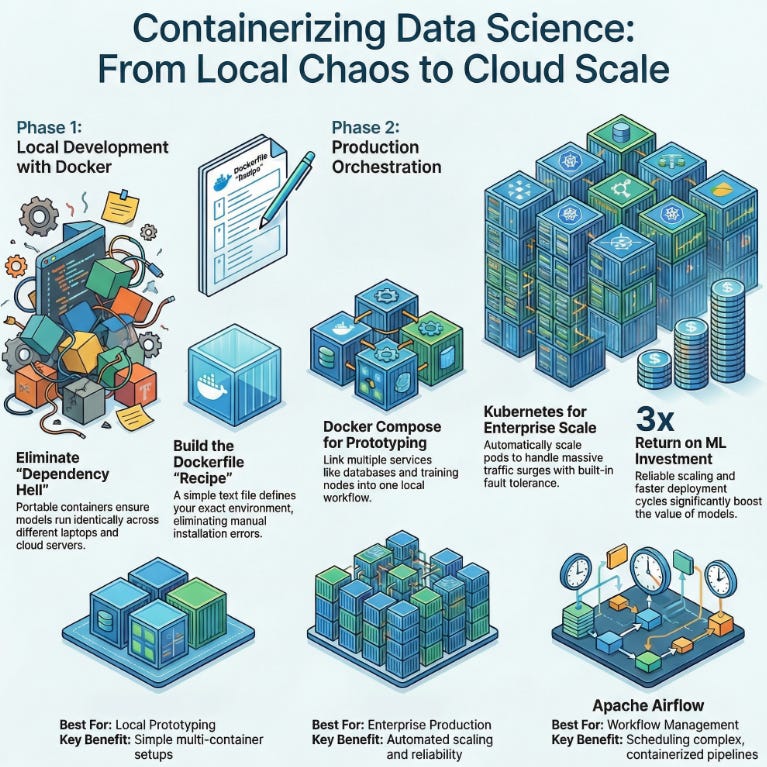
Docker is the undisputed rockstar of container tools open-source, intuitive, and hardened by millions of users worldwide. At its heart, Docker lets you define your environment declaratively via a Dockerfile: a plain-text recipe that’s as straightforward as a shopping list. Start with a base image like FROM python:3.9-slim for a lean Python setup, layer on your dependencies with RUN pip install numpy pandas scikit-learn tensorflow, add your application code via COPY . /app, and expose ports for access, say EXPOSE 8888 for a Jupyter server. Build it with a single command: docker build -t my-ds-env ., and you’ve got a reproducible image ready to run anywhere with docker run -p 8888:8888 my-ds-env.
Let me share a quick anecdote from my early days at a fintech startup in New York we were racing to build a real-time fraud detection model using anomaly detection on transaction streams. Every team member’s local setup was a unique snowflake: macOS folks clashing with Linux servers, conflicting CUDA versions stalling GPU-accelerated training, and endless conda environment exports that never quite translated. We Dockerized the whole shebang overnight: One shared Dockerfile captured our exact stack (including GPU support via NVIDIA’s Docker runtime), and suddenly, docker run became our universal incantation. Training times dropped by 40%, and handoffs? Seamless.
Implementation tip for the trenches: Always optimize your Dockerfile for efficiency use multi-stage builds to separate build-time dependencies (like compilers) from runtime ones, keeping final images lean (aim for under 1GB to slash transfer times). For data science specifics, mount volumes with -v /host/data:/container/data to persist those massive CSV or Parquet files without bloating the image. And don’t sleep on docker-compose up for local multi-service setups: Define a YAML file with services for your ETL preprocessor (pulling data via APIs), a training container (running on CPU or GPU), and a visualization dashboard all interconnected via Docker networks. It’s like assembling Lego bricks for your pipeline: Polite, precise, and profoundly productive, turning solo experiments into team-ready prototypes.
Orchestrating Containers: From Solo to Symphony
Implementation gets you running; orchestration is where you scale to symphonic levels, managing fleets of containers like a maestro directing an orchestra through peaks and valleys. Start simple with Docker Compose, your go-to for development: It’s a YAML config that orchestrates multiple containers as “services.” Define persistent volumes for datasets (e.g., mounting S3-synced data to survive restarts), networks for inter-container chatter (like your model server querying a Redis cache), and even environment variables for secrets like API keys. Fire it up with docker-compose up -d in detached mode, and voilà you’ve got a full-stack data science lab: A Jupyter container for exploration linked to a PostgreSQL service for querying terabyte-scale tables, or a Spark cluster for distributed processing. It’s ideal for prototyping end-to-end workflows, like ingesting raw logs, cleaning with Pandas, training a LightGBM model, and serving predictions all locally, without cloud bills piling up.
But when your ambitions grow (and they will), graduate to Kubernetes (affectionately K8s), Docker’s enterprise-scale kin. K8s abstracts containers into “pods” (logical groups), auto-scaling them based on metrics like CPU load or queue depth imagine ramping from 5 to 50 inference pods during a Black Friday surge in e-commerce demand forecasting. It handles fault tolerance (restarting failed pods), rolling updates (zero-downtime deploys), and even service discovery across clusters. A real-world gem from my consulting days at a healthcare AI firm: We orchestrated Dockerized NLP models on K8s to process anonymized patient notes for drug interaction predictions. Parallel pods devoured gigabytes of text in hours, not days, with built-in health checks alerting us to stragglers. The technical blend shines here features like Horizontal Pod Autoscaling (HPA) meet industry triumphs, like slashing deployment cycles from days to minutes and boosting ROI on ML investments by 3x through reliable scaling. Pro advice: Prototype with Compose for speed, then Helm-chart your way to K8s as complexity mounts. It’s the bridge from tinkerer to titan in data orchestration.
Recommended Reads
5 Simple Steps to Mastering Docker for Data Science
A straightforward guide breaking down Docker’s role in making ML workflows portable and consistent perfect for beginners tackling their first containerized project. Check it outBest Practices for Using Docker in Data Science Projects
Explore how Docker streamlines development, deployment, and collaboration in data-driven work, with actionable advice to avoid common pitfalls. Check it outOrchestrate Containers for Development with Docker Compose
Dive into practical orchestration techniques using Docker Compose, focusing on building multi-container setups for efficient dev environments. Check it out
Trending in AI and Data Science
Let’s catch up on some of the latest happenings in the world of AI and Data Science
Anthropic clinches $380bln valuation after $30bln funding round
Anthropic raised $30 billion, boosting its valuation to $380 billion amid surging AI interest. Claude Code drives $2.5 billion run-rate revenue, quadrupling subscriptions with enterprise focus. The firm also backs AI regulation via $20 million donations.Luma AI plans to open new Saudi office to accelerate HUMAIN Create
Luma AI opens a Riyadh office to expand in MENA, partnering with HUMAIN for Arabic-native AI models via HUMAIN Create. Backed by top investors, it hires locally and teams with Publicis Groupe for AI-driven ads. Project Halo supercluster powers development.Saudi Aramco, Microsoft sign deal to boost industrial AI, digital transformation
Saudi Aramco and Microsoft signed an MoU to deploy Azure AI for industrial efficiency and competitiveness. Initiatives target energy systems innovation and skill-building in AI, cybersecurity, data governance across the Kingdom.
Trending AI Tool: Apache Airflow

Wrapping up with a hot recommendation Apache Airflow, the open-source workflow orchestration powerhouse that’s buzzing in 2026 for ML teams everywhere. It empowers you to author, schedule, and monitor complex pipelines as elegant Python code (via Directed Acyclic Graphs, or DAGs), with native Docker integration for running tasks in isolated containers think triggering a model retrain only after data validation passes, all with retries, SLAs, and Slack alerts baked in. In practice, it’s transformed drudgery into delight: One team I advised used it to chain Dockerized Spark jobs for feature engineering with Kubeflow for training, cutting manual oversight by 70% and enabling weekly model updates on fresh e-commerce data.
Learn more.
Follow Us:
LinkedIn | X (formerly Twitter) | Facebook | Instagram
Please like this edition and put up your thoughts in the comments.